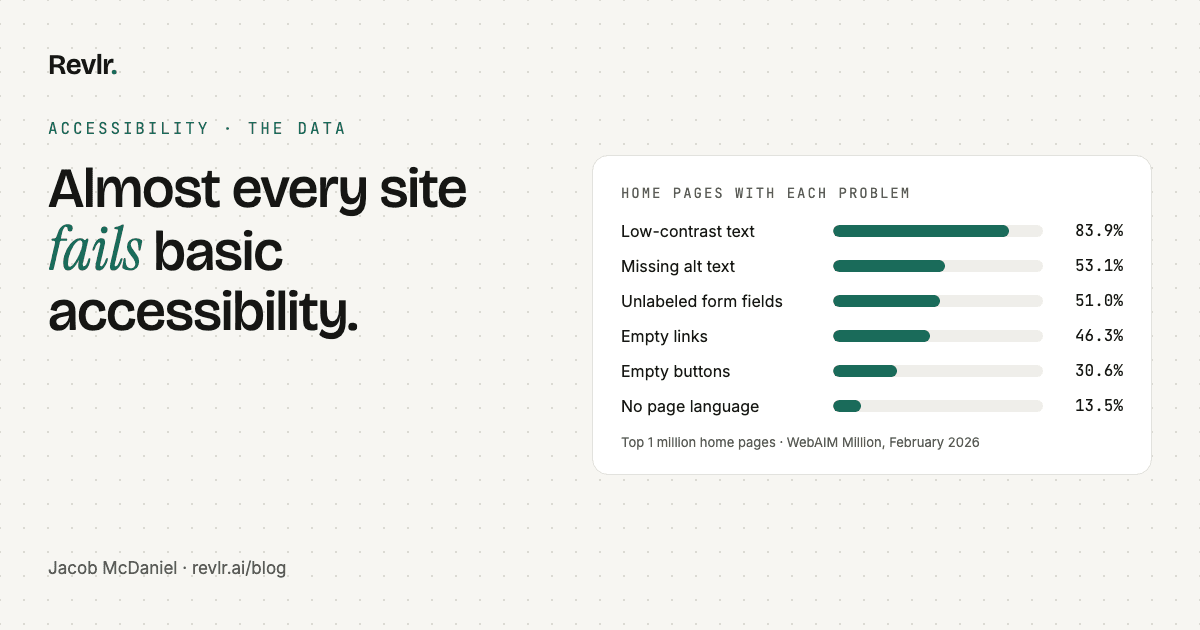
Every February, the nonprofit WebAIM runs automated accessibility tests on the home pages of the top one million websites. The 2026 results came out this spring, and they're not great.
95.9% of those home pages had detected WCAG 2 failures, up from 94.8% the year before. The average home page had 56.1 errors, 10% more than in 2025. WCAG is the Web Content Accessibility Guidelines, the international standard for accessible websites. (Our accessibility check page covers what that means for your site.)
Here's the part nobody leads with: six problems account for 96% of every error WebAIM found. You don't need to master a 50-item standard to fix most of what's wrong. You need to fix six things.
Why this matters for a business
More than 1 in 4 U.S. adults, over 70 million people, reported having a disability in 2022. Not all of them use a screen reader or a keyboard. But the ones who do can't buy from a site they can't use, and they don't send an email explaining why they left.
The short list
Percentages are the share of the top million home pages with each problem, from WebAIM's 2026 report.
Accessibility · The data
Six problems cause 96% of the errors
- Low-contrast text83.9%
- Images with no alt text53.1%
- Form fields with no label51%
- Links with no text46.3%
- Buttons with no text30.6%
- No page language13.5%
1. Text that's hard to read: 83.9%
Light gray text on a white background. White text on a pale photo. It looks clean in a design file and disappears on a phone in sunlight. The average home page had 34 separate pieces of low-contrast text, up 15% in a year.
The fix: WCAG asks for a contrast ratio of at least 4.5 to 1 for normal text, and 3 to 1 for large text. Any free contrast checker will tell you the ratio for two colors. Usually it means darkening a gray by a shade or two. Nobody will notice except the people who can finally read it.
2. Images with no alt text: 53.1%
Alt text is the short description a screen reader reads out in place of an image. Without it, a screen reader might announce the file name ("IMG underscore 4471 dot jpeg") or just "image." Across all the pages tested, 16.2% of images had no alt text at all.
The fix: Describe what the image is doing on the page, not every pixel in it. A photo of your team at work: "Our three designers reviewing a homepage layout." A purely decorative swoosh should get an empty alt (alt="") so screen readers skip it.
3. Form fields with no label: 51%
A field that says "Email" in light gray inside the box, which vanishes once you start typing, isn't labeled. That gray text is a placeholder. A screen reader may not announce it, and anyone who looks away mid-form forgets what the box was for.
The fix: Give every field a real, visible label connected to it in the code. If your contact form is built with a form plugin, there's usually a setting for this.
4. Links with no text: 46.3%
These are almost always icon links: the Instagram logo, the LinkedIn logo, the little envelope. They look obvious. To a screen reader, each one is just "link."
The fix: Give each icon link a text name the screen reader can read, like "Our Instagram." Your developer can add it with an aria-label or hidden text in a few minutes.
5. Buttons with no text: 30.6%
Same problem, different element. The hamburger menu, the magnifying glass, the X that closes a pop-up. A screen reader user hears "button" and has to guess.
The fix: Same as links. "Open menu," "Search," "Close."
6. No page language: 13.5%
One missing attribute in the page's code. Without it, a screen reader may read your English page with the wrong pronunciation rules.
The fix: <html lang="en">. This is the easiest accessibility fix on the internet, and 13.5% of the biggest sites still miss it.
A note on ARIA
ARIA is code that adds extra information for assistive technology. WebAIM found that 82.7% of home pages use it now. Pages with ARIA averaged 59.1 errors, compared with 42 on pages without it.
Accessibility · ARIA
More ARIA, more errors (on average)
- Pages that use ARIA59.1 errors
- Pages with no ARIA42 errors
WebAIM is careful to say that doesn't prove ARIA causes errors. Pages that use more ARIA also tend to be more complex. But it matches what we see in our own audits: ARIA added on top of the wrong HTML doesn't fix anything. A real <button> beats a <div> with three ARIA attributes every time.
What this list can't tell you
Automated tests are good at the six problems above, because a computer can check them. They can't tell you whether your alt text actually makes sense, or whether a real person can get through your checkout using only a keyboard. Fixing the short list gets you most of the way. A person testing with a screen reader gets you the rest.
How Revlr checks this
Every Revlr scan tests all six: contrast, alt text, form labels, link names, button names and page language, plus heading order, ARIA attributes and common keyboard blockers. Your free scan includes your Accessibility score. Paid plans list every element that failed and how to fix it.
See everything we check on the accessibility check page.
Questions
Low-contrast text. WebAIM's 2026 study found it on 83.9% of the top one million home pages, with an average of 34 instances per page.
In WebAIM's 2026 study, 95.9% of the top one million home pages had detected WCAG 2 failures, with an average of 56.1 errors per page.
Low-contrast text, images with no alt text, form fields with no label, links with no text, buttons with no text, and a missing page language. Together they made up 96% of the errors WebAIM found in 2026.
No. Automated tests reliably catch problems like low contrast and missing labels, but they can't judge whether alt text makes sense or whether a person can finish a task with a keyboard or screen reader. Pair a scan with a manual review.
Sources
Find out which of the six you have.
A free Revlr scan gives you your Accessibility score in a few minutes.
Scan my site